

 Email Management
 Artificial Intelligence
 Physical Archive Management
 Document Lifecycle
 Library Management
 Security and Compliance
 QR Code Generator
 McFile for Office 365
 McFile for Business Central
 McFile for Outlook
 Electronic Signature
 Compliance
 Legal
 Construction
 Human Resources
 Energy
 Healthcare
 Project Management
 Digitization Services
 Educational Institution
 Retail
 Cases
 Blog
 What’s New
 About us
 For developers
 For Users
 Contact

Anyone who uses McFile every day knows that speed makes all the difference: checking a record in the field, sending a document on the spot or finding information in seconds. With that in mind, we are launching the McFile app 2.0, which brings a brand-new menu, the Maya artificial intelligence assistant right on your phone, a profile page and a notification center. The new version is now available on Google Play and the App Store.
New floating menu: everything one tap away, on every screen
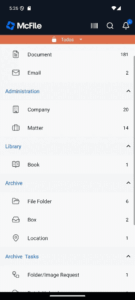
The highlight of this update is the new floating menu, which replaces the old fixed tab bar. It was redesigned to follow you throughout the app, not just on the main screens.
- Always within reach: Home, Offline, Maya, Profile and More are also available in search results and inside a record. No more going back several screens to switch sections.
- Out of the way when you need space: the menu tucks away while you scroll through a list or open the search filters, so the content gets the whole screen.
- “+” button with quick actions: the central button opens a circular menu with the upload options. Inside a record, the file goes straight into that record, with no extra steps. Remember the scanning tool from version 1.9? Now it is one tap away from anywhere in the app.
- Smoother navigation: when you switch tabs from an inner screen, the app takes you straight to where you want to go, without piling up open screens along the way.
Maya, McFile’s AI assistant, now on your phone
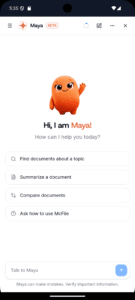
Maya, McFile’s artificial intelligence assistant, is now in the app as well. You can chat with her in full screen, wherever you are, just as easily as on your computer.
How to access it: it couldn’t be simpler! Tap the Maya icon in the floating menu. The feature is available to users of companies that have Maya enabled. Want to turn it on for your operation? Talk to our experts.
Profile page and notification center
- New profile: a dedicated tab brings together your photo, name, e-mail and domain, plus the option to sign out, all in one place.
- Notifications front and center: at the top of the app, a bell shows how many alerts you haven’t read yet. One tap takes you straight to the Alerts screen, so no important notice slips by.
A look designed for the latest smartphones
The layout has been adjusted for today’s devices. Lists are no longer hidden behind the menu or the iPhone gesture bar, and the app is ready for Android 16, which displays content edge to edge. The result is a more comfortable reading experience on any device.
Update to the McFile app 2.0 now!
Keep your digital collection always at hand. If you already use the app, update it right now. If you don’t have it yet, download version 2.0:


More improvements in the McFile app
Beyond what’s new in the McFile app 2.0, the latest updates also brought:
- Large collections without interruptions: opening a typology in databases with millions of documents (we tested it on collections with more than 10 million) no longer ends in an error. The listing loads completely, even at the largest volumes.
- Clearer error messages: when something doesn’t go as expected, the app now tells you why: a timeout, no connection or a server issue.
- More stable sessions: automatic login renewal is now more reliable, so you use the app with fewer interruptions.
If you are not yet a client, try McFile for free and see firsthand how the platform can transform your business.
McFile. Drive your efficiency.