

 Email Management
 Artificial Intelligence
 Physical Archive Management
 Document Lifecycle
 Library Management
 Security and Compliance
 QR Code Generator
 McFile for Office 365
 McFile for Business Central
 McFile for Outlook
 Electronic Signature
 Compliance
 Legal
Legal Construction
 Human Resources
 Energy
 Healthcare
 Project Management
 Digitization Services
 Educational Institution
 Retail
 Cases
Cases Blog
Blog What’s New
 About us
 For developers
 For Users
 Contact
Access McFile in a practical, efficient, and secure way — and unlock powerful new features through SSO (Single Sign-On) authentication. Enabling SSO integrates your McFile login with external identity and access management (IAM) providers such as Microsoft Entra ID and Google Cloud. This setup is ideal when the email you use in McFile is the same one managed by one of these IAM providers.
What is Single Sign-On (SSO)?
Single Sign-On allows you to use the same account to sign in to multiple applications and services. With SSO, you only need to provide your credentials once to access different platforms — including McFile. For example, if you’re already signed in to Outlook, you can access McFile quickly and seamlessly. Check below to see how fast the login process becomes once these credentials are enabled.
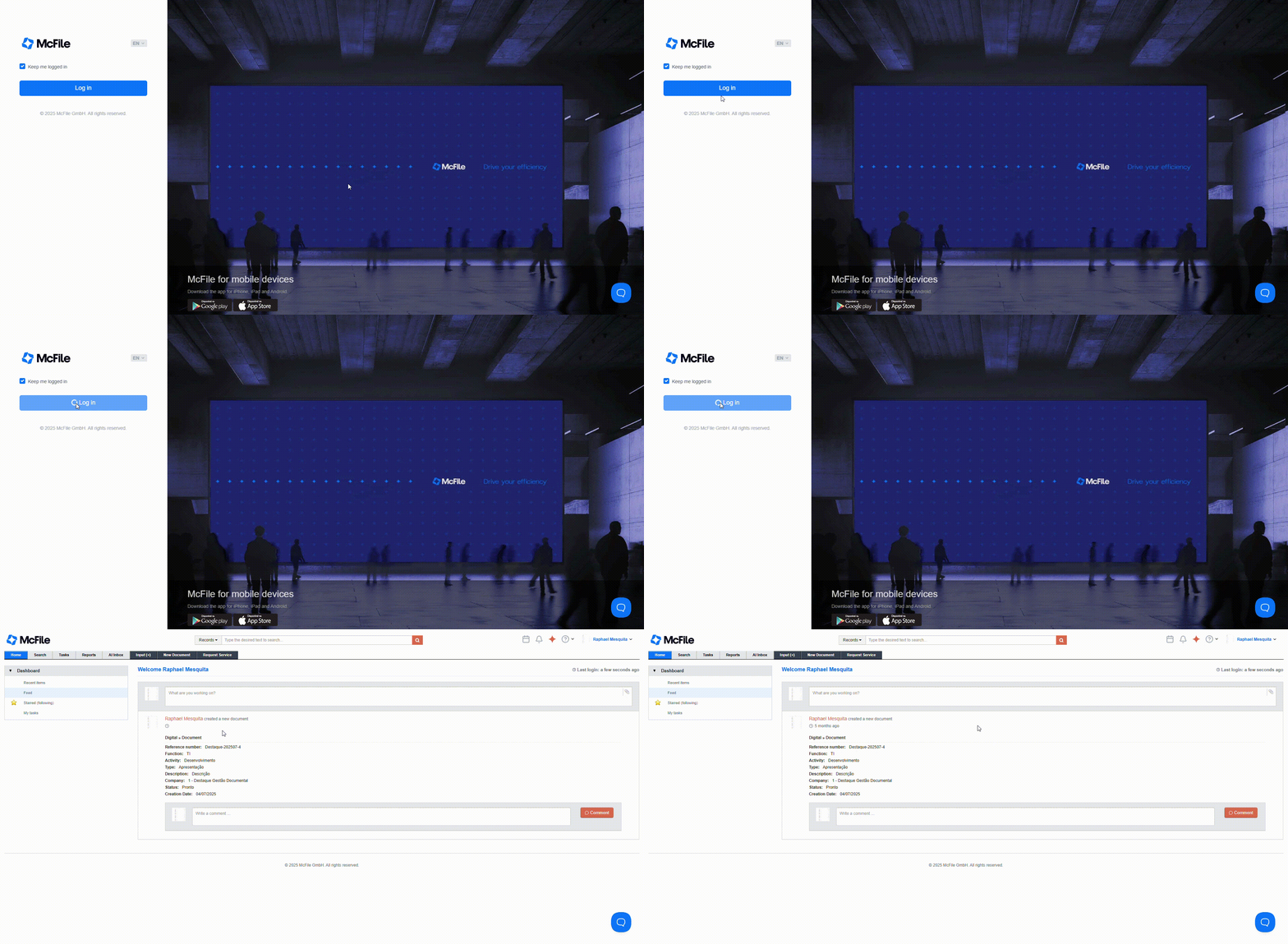
In addition, that same signed-in account — your single credential — can be used by McFile to connect you to external services that also rely on SSO. This expands your integration options and enhances how you can use the platform.
Ultimately, SSO is provided by identity and access management (IAM) systems such as Microsoft Entra ID. By using SSO to access McFile, you benefit from all the additional security layers offered by your IAM provider, including user access control and enhanced authentication safeguards.
Exclusive Features Unlocked with SSO
By integrating your McFile login with an external identity and access provider, you can unlock several additional features:
AI Inbox
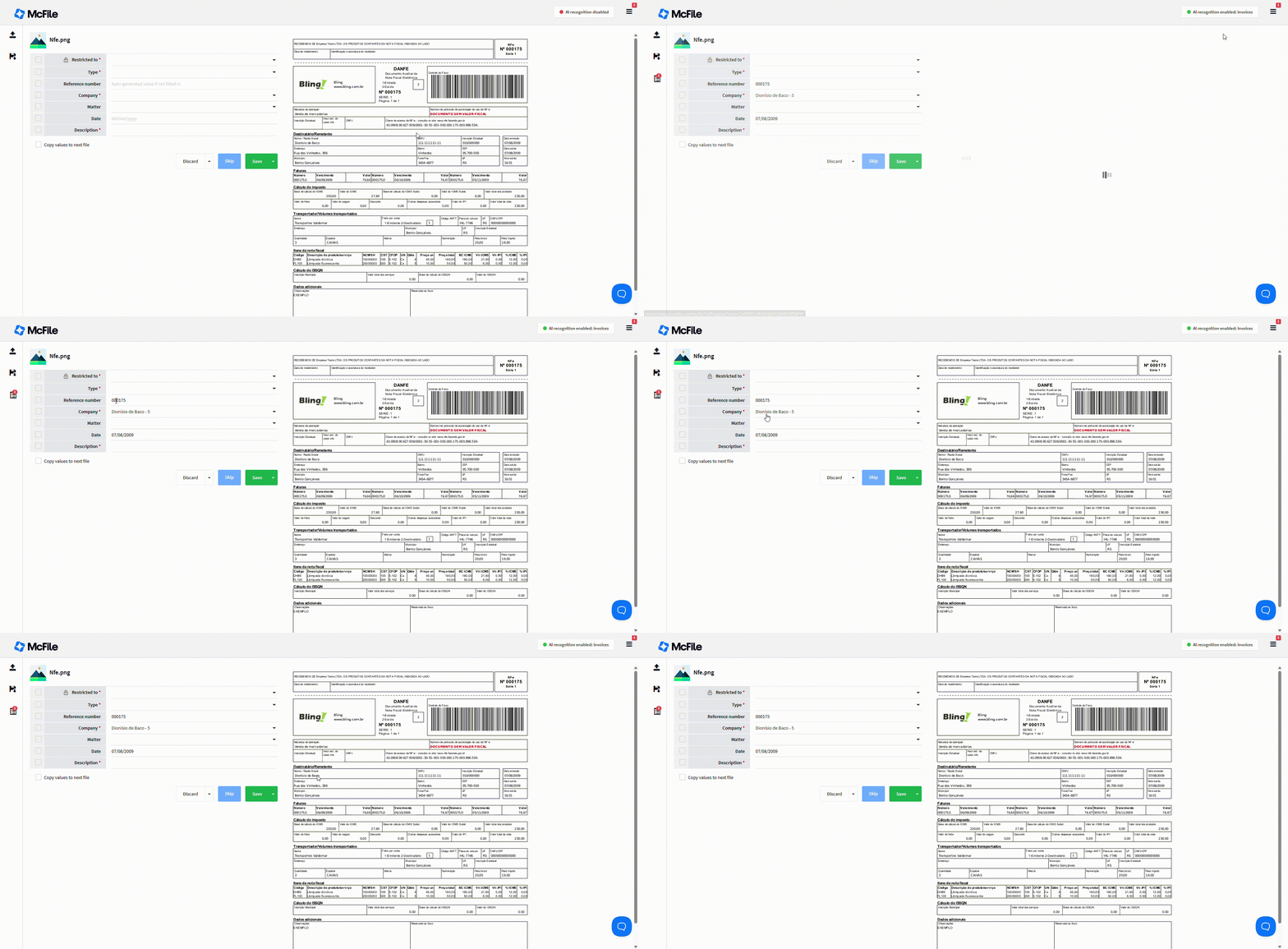
The AI Inbox is a McFile feature designed to simplify document submission and metadata entry. With it, you can upload files, review information, and apply AI-powered automatic data recognition — all within a single interface.
We’ve already published an article on our blog about this feature, so feel free to learn more by reading McFile’s Smart Inbox: Fill in Metadata Quickly with Artificial Intelligence.
McFile for Office
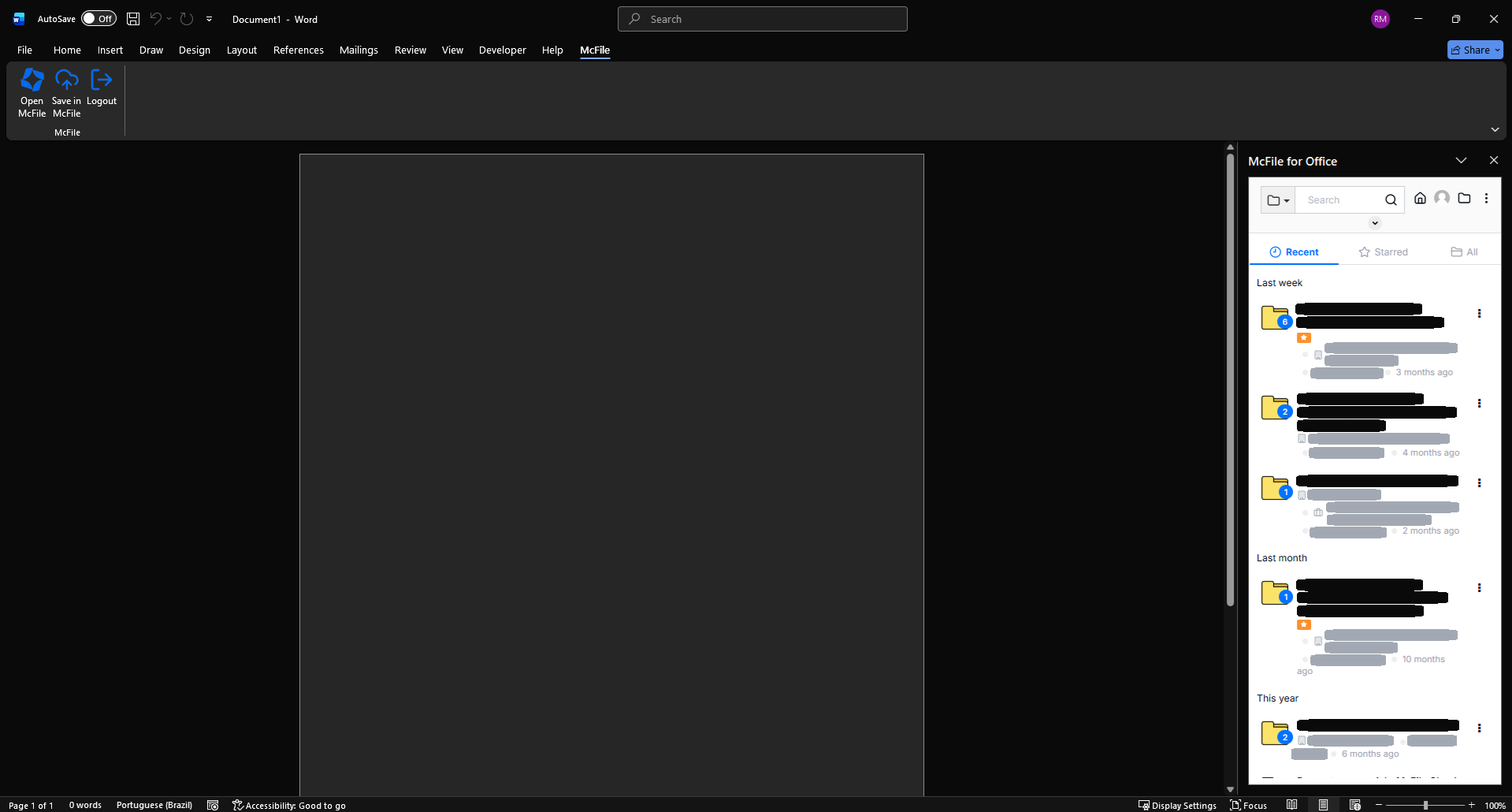
McFile for Office and McFile for Outlook are add-in integrations designed for Microsoft Office applications and the new Outlook. These solutions can significantly enhance your workflows and boost your organization’s overall efficiency. In a corporate environment where most employees spend a considerable portion of their time using Microsoft 365 and the new Outlook, McFile’s integrations deliver a substantial increase in productivity.
Security Advantages of Single Sign-On
Password and Credential Security
With SSO, you no longer need to manage an additional account and password, since your access to McFile is handled through a credential you already use in another SSO-enabled application.
Access Control
When you migrate your login method to SSO, user access control can be managed directly by your identity provider, such as Microsoft Entra ID. This means a user can only sign in if they are included within that provider. In addition, McFile offers optional layers of control — such as privilege management, restricted-access areas, and group-based profiles — all of which can be governed by the identity provider.
Authentication Security
Since authentication is handled by an external provider such as Microsoft Entra ID, you benefit from the additional security features it offers — for example, multi-factor authentication.
Automatic Deactivation of Offboarded Users
Once a user is offboarded from the identity and access provider, they are automatically deactivated in McFile. This prevents duplicated work and ensures consistent access control.
Reduced Attack Surface
Because SSO centralizes authentication into a single login, the number of potential security vulnerabilities is drastically reduced.
How to Migrate Your Login to SSO
To complete the migration, a few steps must be carried out together with McFile Support (suporte@mcfile.com.br
)
- Verify that all McFile login emails match the email addresses in your identity provider.
- Create a “McFile” application in your identity provider, such as Microsoft Entra ID.
- Configuration in the Staging Environment
- Authentication Testing and Validation
- Production Environment Migration for Authentication Change
Once the migration is complete, you and all users in your environment will only be able to access McFile if you are included in the selected identity provider. It’s important to follow the steps above to ensure everything works smoothly.
Streamline Your Access to McFile with Security
With this alternative login method, accessing the platform becomes simple, seamless, and highly secure. Plus, the unlocked features add efficiency and practicality to your daily operations. If you’re not a customer yet, try McFile for free and experience firsthand how the platform can transform your business.
McFile. Drive your efficiency.