

 Email Management
 Artificial Intelligence
 Physical Archive Management
 Document Lifecycle
 Library Management
 Security and Compliance
 QR Code Generator
 McFile for Office 365
 McFile for Business Central
 McFile for Outlook
 Electronic Signature
 Compliance
 Legal
Legal Construction
 Human Resources
 Energy
 Healthcare
 Project Management
 Digitization Services
 Educational Institution
 Retail
 Cases
Cases Blog
Blog What’s New
 About us
 For developers
 For Users
 Contact
Keeping your work routine organized and ensuring no important information gets lost in the e-mail flow is one of the biggest challenges in the corporate day-to-day. To make your experience more integrated and frictionless, we have prepared several improvements and gathered the news from McOffice here.
McOffice updates: a brand-new look
The first new feature you’ll notice as soon as you open Word, Excel, PowerPoint, or Outlook is that McOffice has a new look. The icons, formerly red, have been redesigned in blue, bringing McFile’s new visual identity into Office. This makes the McOffice bar more modern and aligned with the platform you use every day.

“McFile” category in archived emails
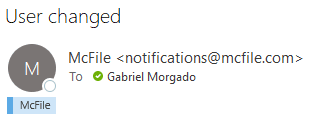
Now it’s much easier to know what has already been saved: archived e-mails receive a blue category called “McFile”. With this visual identification, you can see right in your e-mail list which messages are already in McFile, avoiding doubts and rework. Furthermore, the category stays on the e-mail even after you reply to or forward it.
We have also expanded the tagging to cover even more scenarios in your workflow:
- Sent items: when sending an e-mail with McFile in To, Cc, or Bcc, including a “Reply All” that keeps McFile copied, McOffice tags the copy in Sent Items right after sending.
- Received e-mails: messages that arrive with McFile in To or Cc, such as those sent by colleagues, are tagged a few seconds after they arrive.
- E-mails that arrived while Outlook was closed: when opening Outlook, McOffice reviews the Inbox and Sent Items of all your accounts and tags what was left behind.
More precise and less invasive
McOffice’s behavior has been refined to act discreetly and reliably behind the scenes:
- Zero mistakes: the system now features an improved mechanism to avoid erroneously tagging e-mails.
- Preservation of categories: McOffice adds the McFile category to any existing email categories without replacing them.
- Nothing goes out to recipients: McOffice only applies the category after the message is sent; therefore, it does not reach the person receiving your e-mail.
- Without freezing Outlook: tagging happens gradually in the background while you continue working.
Smart forwarding to McFile
Need to save an important message that is already in your inbox? Now, when forwarding an e-mail to McFile, it archives the complete original e-mail. This way, the record preserves the original sender, recipients, date, and attachments, without cluttering the information with the forwarder’s details. Shortly after, the email in your inbox also receives the McFile category.
Enhanced file management in Word, Excel, and PowerPoint
In addition to emails, McOffice’s Open and Save windows have also gained new organization features to help you locate what you need in seconds:
- Text filter: type part of the name, user, format, or version, and the list will show only matching files.
- Column sorting: a single click on the header sorts the list by that column; another click reverses the order.
- Return of the Version column: the version column is once again displaying the number clearly, making it easier to control document revisions.

Further developments in the McFile ecosystem
Beyond the McOffice updates, we are bringing other improvements to McFile:
- Batch download directly from the search screen: it is now possible to select multiple records in your search results and download them all at once.
- New option for link sharing: the “Only users with existing access” option creates a sharing link restricted to users who already have permission to view the record.
Organization that evolves along with yours
After all, the McOffice updates show that McFile and its tools continue to evolve alongside your organizational process, aiming for a more efficient and practical management of your digital assets. If you are not yet a client, try McFile for free and see firsthand how the platform can transform your business.
McFile. Drive your efficiency.